Productivity & Global Workflow
How to Use the Multi-City Time Zone Converter for Seamless Global Coordination
Eliminate mental math errors, navigate Daylight Saving Time transitions, and find the perfect overlapping meeting window across continents.
In our increasingly distributed, remote-first global economy, scheduling a team meeting can quickly become a agonizing puzzle. If your lead designer is in Berlin, your developers are in Bangalore, your product manager is in New York, and your executive sponsor is in San Francisco, finding a single hour where everyone is awake and at their desks requires serious effort.
Too often, professionals rely on vague mental arithmetic—subtracting three hours here, adding five hours there, and forgetting that certain regions changed their Daylight Saving Time clocks last weekend. The result? Accidental 3:00 AM meeting invites, missed client calls, and frustrated team members.
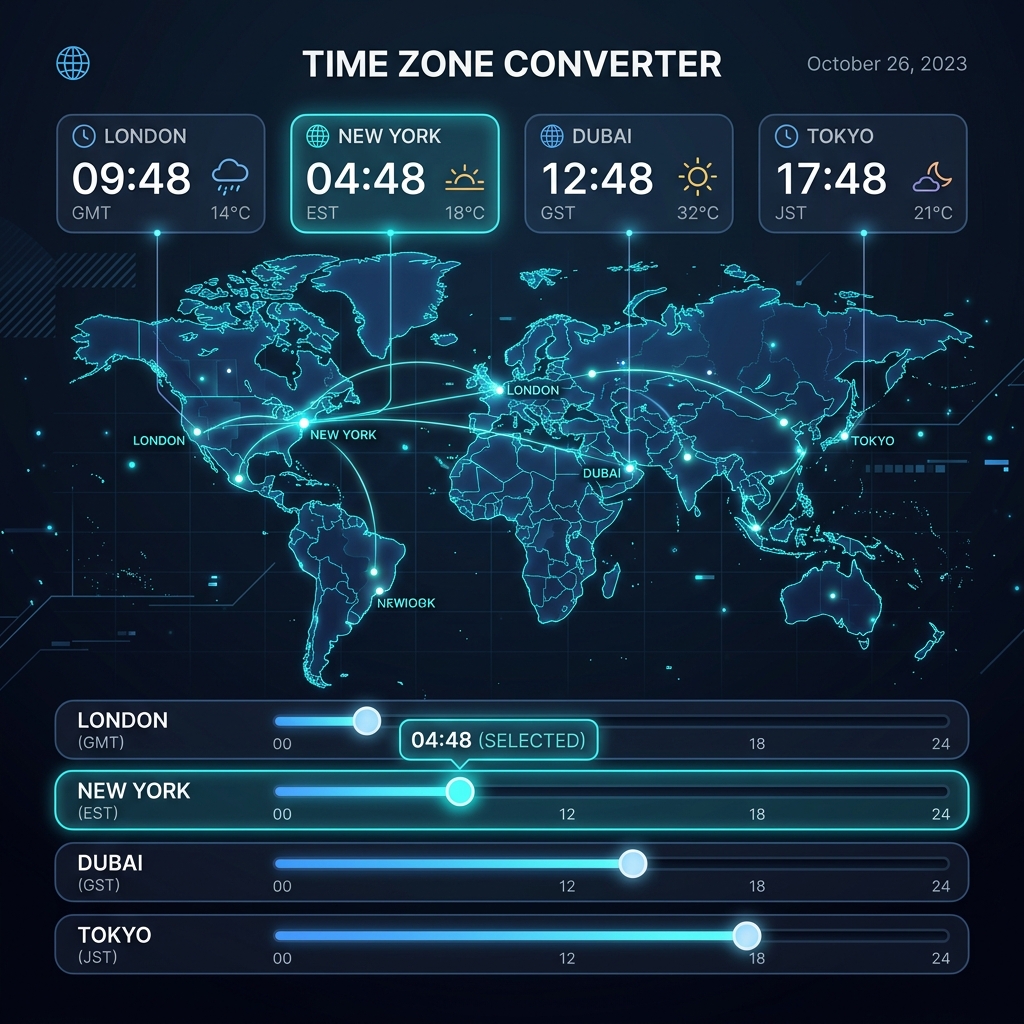
The Multi-City Time Zone Converter on DayLogic was designed to replace guesswork with a visual, interactive synchronization engine.
1. The Flaw of Traditional Two-City Converters
Most basic time zone websites on the internet only allow you to compare two locations at a time (e.g., "New York to London").
If your project involves team members in four or five different geographic regions, a two-city converter forces you to perform multiple separate searches, jotting down numbers on paper or sticky notes to find a mutual opening.
DayLogic solves this by introducing a Stacked Multi-City Architecture. You can stack as many cities as you need into a single unified workspace.
2. The Synchronized Time Slider
The core innovation of the DayLogic Time Zone Converter is its Synchronized Interactive Slider.
**How the Synchronized Slider Works** As you drag the timeline slider for any city in your stack (e.g., setting London to 3:00 PM), the times for San Francisco (7:00 AM), New York (10:00 AM), Berlin (4:00 PM), and Tokyo (12:00 AM next day) update in real-time instantly.
This visual feedback allows you to scrub back and forth through a 24-hour cycle, watching how daytime and nighttime shift dynamically across the globe.
3. Finding the "Golden Hour" of Overlapping Business Hours
Beyond simple clock conversions, the real goal of global scheduling is identifying overlapping working hours.
DayLogic highlights standard working hours (9:00 AM – 5:00 PM local time) in subtle green accents across every city row:
- Green Highlight: Indicates standard local working hours.
- Amber Highlight: Indicates early morning or early evening hours (suitable for flexible team members).
- Dark Slate Highlight: Indicates night/sleeping hours (should be avoided).
By adjusting the slider until multiple rows display green or amber, you can immediately spot the "Golden Hour"—the precise window where every team member can attend without compromising their personal sleep schedules.
4. Handling Daylight Saving Time (DST) Automatically
Daylight Saving Time is the single greatest cause of missed global appointments.
In March and October, countries transition into and out of DST on different dates. For example, the United States springs forward two weeks before European countries adjust their clocks. During those two weeks, the usual 5-hour gap between New York and London shrinks to 4 hours!
DayLogic’s conversion engine handles all historical and future DST shifts automatically using authoritative IANA time zone databases. When you select a date, the tool adjusts for local DST rules behind the scenes.
5. Generating Multi-City Meeting Invites in One Click
Once you have identified the ideal time, communicating it to your team clearly is essential. Simply stating "Meeting at 2:00 PM EST" forces European and Asian colleagues to do conversion math on their end.
DayLogic features a "Copy Meeting Summary" button. With a single click, it copies a formatted multi-city summary to your clipboard:
📅 Global Sync Meeting Time:
• San Francisco (PST): 9:00 AM
• New York (EST): 12:00 PM
• London (GMT): 5:00 PM
• Berlin (CET): 6:00 PM
Paste this summary directly into your Slack channel, calendar invitation, or email thread so everyone has complete clarity.
6. Try DayLogic’s Time Zone Converter Today
Never miss an international call or force a colleague to wake up at 3:00 AM again.
Visit the DayLogic Time Zone Converter to build your custom city stack and coordinate global schedules effortlessly.
Build Your Global City Stack
Coordinate multi-city teams, find overlapping working hours, and copy clean meeting summaries instantly.