Picture this classic frontend development scenario: You are building a sleek new button component. Your brand designer gives you the primary brand color in hex format: #3B82F6. Everything looks crisp.
Now, you need to create the button's hover state (a slightly darker tint), an active state (a deeper shade), a focus ring (a translucent outline), and a disabled state (a muted, desaturated version).
How do you calculate those states from #3B82F6?
If you are like most developers, you probably open Figma or a browser color picker, drag the cursor randomly until it "looks about right," and paste five arbitrary hex codes into your stylesheet:
/* The Unmaintainable "Guess-and-Check" Approach */
--btn-bg: #3b82f6;       /* Base Blue */
--btn-hover: #2563eb;    /* What math connects this to the base? Nobody knows. */
--btn-active: #1d4ed8;   /* Another arbitrary hex pick */
--btn-disabled: #93c5fd; /* Hand-picked pastel */
This "guess-and-check" workflow is fragile, unmaintainable, and mathematically disjointed. If your company ever rebrands from blue to emerald green, you have to hand-pick every single interactive state all over again.
The solution isn't better color pickers—it is understanding Color Spaces. Let's explore the optical physics of RGB, the base-16 shorthand of HEX, and why HSL (Hue, Saturation, Lightness) is the game-changer for modern design engineering.
1. How Digital Screens Work: The Additive RGB Model
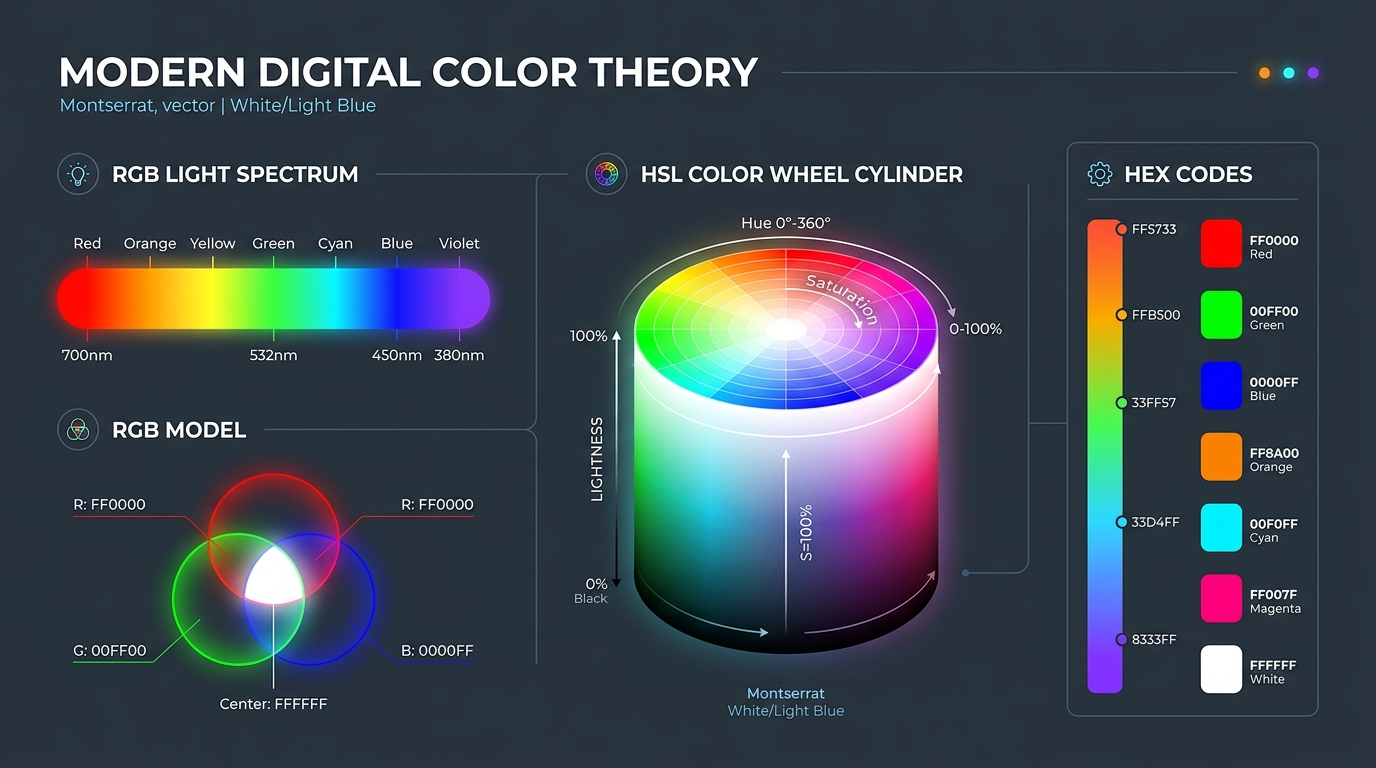
Every digital screen in front of you—whether an OLED smartphone, a high-refresh gaming monitor, or a MacBook Retina display—contains millions of microscopic pixels. Each physical pixel is made of three physical light emitters: Red, Green, and Blue subpixels.
Unlike physical paint on paper (which uses subtractive pigment mixing where combining colors absorbs light and yields muddy brown), digital displays operate on additive light mixing:
rgb(255, 0, 0)   /* Pure Red: 100% R, 0% G, 0% B */
rgb(0, 255, 0)   /* Pure Green: 0% R, 100% G, 0% B */
rgb(0, 0, 255)   /* Pure Blue: 0% R, 0% G, 100% B */
Each channel has an 8-bit depth, meaning an integer value from 0 (completely turned off) to 255 (maximum brightness output). When all three emitters blast full power simultaneously (rgb(255, 255, 255)), the waves combine to create pure white light. When all three are off (rgb(0, 0, 0)), you get pitch black.
The Math of True Color: With 256 possible intensity levels per channel, an RGB monitor can render 256 × 256 × 256 = 16,777,216 distinct colors (often called 24-bit TrueColor).
2. HEX Codes: Why Computers Love Base-16 Shorthand
If displays understand RGB numbers, why do we write web styles with hexadecimal codes like #FF5733?
Hexadecimal is simply a compact, human-readable representation of raw binary bytes. In base-10 (decimal), we count $0$ through $9$. In base-16 (hexadecimal), we count $0$ through $15$ using digits 0, 1, 2, 3, 4, 5, 6, 7, 8, 9, A, B, C, D, E, F.
Because exactly two hexadecimal digits represent one full 8-bit byte ($16^2 = 256$ possible values from 00 to FF), a 6-character hex code is simply three packed color bytes:
| HEX Pair | Channel | Hex Calculation | Decimal (RGB) Value |
|---|---|---|---|
#3B | Red (R) | (3 × 16) + 11 | 59 |
#82 | Green (G) | (8 × 16) + 2 | 130 |
#F6 | Blue (B) | (15 × 16) + 6 | 246 |
While HEX is extremely compact and convenient for copy-pasting strings, it suffers from a massive architectural limitation: the human brain cannot intuitively modify hex codes. Looking at #7E22CE, you cannot easily tell how to make it 10% warmer or 20% less saturated without computational tooling.
3. The Design Miracle: How HSL Mirrors Human Perception
In the late 1970s, computer graphics pioneers developed HSL (Hue, Saturation, Lightness) to map the RGB color cube into a cylindrical coordinate system that mirrors how the human eye and brain actually perceive color.
- Coordinate 1: Hue (H)
[0° – 360°]— The angle on the color wheel:0°is Red,60°is Yellow,120°is Green,180°is Cyan,240°is Blue,300°is Magenta. - Coordinate 2: Saturation (S)
[0% – 100%]— The color's intensity or purity.100%is vibrant and rich, while0%removes all pigment to yield a neutral grayscale tone. - Coordinate 3: Lightness (L)
[0% – 100%]— The amount of illumination.0%is total black,100%is pure white, and50%represents the pure color at its standard brilliance.
4. Building a Programmatic Design System with CSS Variables & HSL
Here is where the magic happens. By splitting Hue, Saturation, and Lightness into separate CSS custom properties, you can generate complete, mathematically consistent UI component systems with zero guesswork:
/* 1. Define Master Brand Tokens */
:root {
  --brand-h: 217; /* Blue Hue */
  --brand-s: 91%; /* High Saturation */
  --brand-l: 60%; /* Base Lightness */
}

/* 2. Programmatically Derive Interactive States */
.btn-primary {
  background-color: hsl(var(--brand-h), var(--brand-s), var(--brand-l));
}

.btn-primary:hover {
  /* Darken by exactly 8% lightness without changing hue */
  background-color: hsl(var(--brand-h), var(--brand-s), calc(var(--brand-l) - 8%));
}

.btn-primary:active {
  /* Darken by 15% for tactile feedback */
  background-color: hsl(var(--brand-h), var(--brand-s), calc(var(--brand-l) - 15%));
}
With this architecture, if your brand theme ever changes from Blue (--brand-h: 217) to Purple (--brand-h: 270) or Coral (--brand-h: 15), every single hover, active, focus, and border state across your entire application updates automatically with flawless mathematical balance.
5. The Accessibility Catch: Lightness vs. Perceived Luminance
While HSL is vastly superior to HEX for UI generation, you must watch out for one optical illusion known to color scientists: human optical perception is not uniform across wavelengths.
Human retinas contain far more green and red photoreceptor cones than blue ones. As a result, the human eye perceives yellow and green as significantly brighter than blue, even when their mathematical HSL Lightness parameter is identical:
hsl(60, 100%, 50%)(Pure Yellow): Appears blindingly bright. Requires dark text for WCAG 4.5:1 contrast compliance.hsl(240, 100%, 50%)(Pure Blue): Appears deeply dark. Requires crisp white text for WCAG contrast compliance.
Because of this discrepancy, newer perceptual color spaces like OKLCH and APCA (Accessible Perceptual Contrast Algorithm) are gaining support in modern CSS. OKLCH aligns mathematical lightness with real perceived brightness across all hues.
6. Summary Comparison: When to Use Which Format
| Color Model | Best Used For | Human Intuitiveness | Programmatic Theming |
|---|---|---|---|
HEX (#RRGGBB) | Static constants, design file exports, compact CSS values | Low (Machine Code) | Poor (Requires string parsing) |
| RGB / RGBA | Hardware rendering, alpha opacity overlays, canvas manipulation | Moderate | Moderate |
| HSL / HSLA 🌟 | Dynamic UI themes, hover/active state math, design tokens | Very High (Intuitive 3D) | Exceptional (calc() friendly) |
| OKLCH | Next-gen wide-gamut displays (P3), strict perceptual accessibility | High | Exceptional |
7. Explore Design Math & Color Utilities on DayLogic
Mastering the mathematics of color transforms web development from an uncertain guessing game into a predictable, elegant engineering discipline.
DayLogic provides an array of free utilities in our
Design Math Suite, including Golden Ratio calculators, aspect-ratio converters, and typography scale generators. Explore our toolkit to streamline your design workflow today!
Explore DayLogic Design & Math Tools
Calculate geometric ratios, format aspect ratios, and optimize your digital layouts client-side.