There is a legendary computing adage coined by programmer Jamie Zawinski in 1997:
"Some people, when confronted with a problem, think 'I know, I'll use regular expressions.' Now they have two problems."
Anyone who has ever opened a codebase and encountered a string like ^([a-zA-Z0-9_\-\.]+)@([a-zA-Z0-9_\-\.]+)\.([a-zA-Z]{2,5})$ knows this feeling intimately. At first glance, Regular Expressions (Regex) look like someone mashed their keyboard in a fit of rage.
Yet, despite its intimidating syntax, Regex is one of the most transformative superpowers in software development, data science, and digital writing. With a single line of pattern logic, you can search across thousands of log files, sanitize messy CSV databases, extract dates, and automate tedious text transformations in milliseconds.
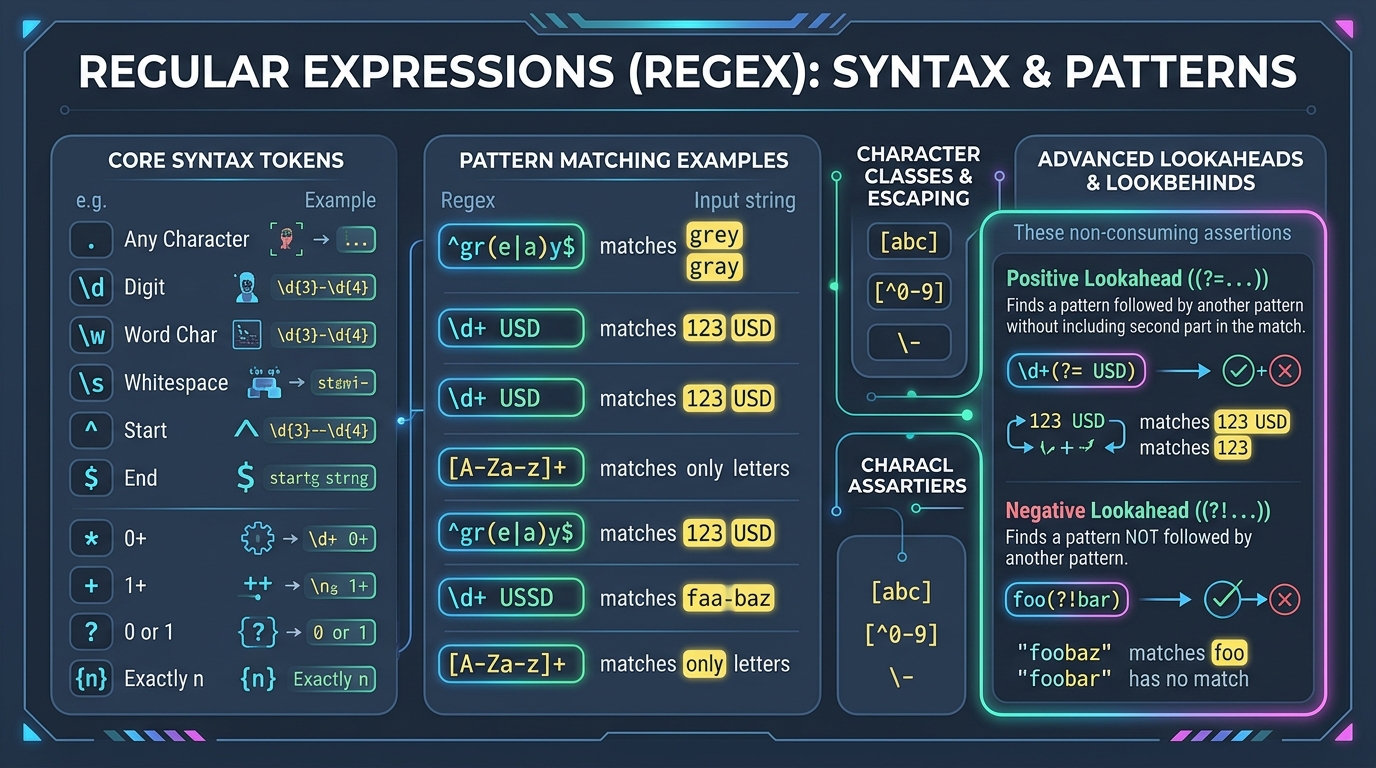
The secret to mastering Regex is to stop memorizing random syntax strings and instead learn the 5 foundational building blocks of the Regex mental model.
1. The 5 Core Mental Models of Regular Expressions
- Anchors
Position without Consuming Characters
Anchors match positions rather than actual letters:
^(Caret) = Matches the absolute start of a string (or start of line).$(Dollar) = Matches the absolute end of a string.\b(Word Boundary) = Matches the boundary between a word character and whitespace/punctuation.
- Character Classes
Defining Sets and Shortcuts
Square brackets [ ] define a set where any single character inside will match:
[aeiou]= Matches any single vowel.[^0-9]= Caret inside brackets means negation (matches anything that is NOT a digit).\d= Any digit ([0-9]).\w= Any alphanumeric word character or underscore ([a-zA-Z0-9_]).\s= Any whitespace (space, tab, newline).
- Quantifiers
How Many Times to Repeat?
Quantifiers apply to the token immediately preceding them:
*= Zero or more times (optional repeat).+= One or more times (mandatory repeat).?= Zero or one time (optional single occurrence).{3,6}= Between 3 and 6 times.
2. Greedy vs. Lazy: The #1 Bug That Trips Up Developers
By default, Regex quantifiers (* and +) are Greedy. They will consume as much text as humanly possible before stopping.
Imagine you are trying to extract HTML tags from this string: **Important Notice** Please Read.
# ❌ Greedy Pattern: <.*>
# Matches from the very first <tag> all the way to the very last </tag>!
# It treats the entire paragraph as a single giant match.

# ✅ Lazy Pattern: <.*?>
# Adding a "?" turns the quantifier Lazy.
# It stops at the very first closing ">", cleanly matching individual HTML tags.
3. Advanced Superpower: Lookahead and Lookbehind Assertions
Sometimes you want to match a pattern only if it is preceded or followed by something else, without including that surrounding text in the resulting match. These are called Zero-Width Lookarounds:
| Assertion Type | Syntax | Example Pattern | What it Matches |
|---|---|---|---|
| Positive Lookahead | X(?=Y) | \d+(?=\s*USD) | Matches 120 in "120 USD" (excludes "USD") |
| Negative Lookahead | X(?!Y) | \d+(?!%) | Matches numbers NOT followed by a percent sign |
| Positive Lookbehind | (?<=Y)X | (?<=\$)\d+ | Matches 50 in "$50" (excludes "$") |
| Negative Lookbehind | (?<!Y)X | (?<!https:\/\/)\w+\.com | Matches domains NOT preceded by secure protocol |
4 3 Essential Real-World Recipes You Can Copy Today
// Recipe 1: Extract ISO-8601 Date (YYYY-MM-DD) with Named Capture Groups
/(?<year>\d{4})-(?<month>0[1-9]|1[0-2])-(?<day>0[1-9]|[12]\d|3[01])/
// Captures: match.groups.year = "2026", month = "08", day = "20"

// Recipe 2: Parse Markdown Links into Text & URL
/\[(?<label>.*?)\]\((?<url>https?:\/\/[^\s\)]+)\)/g
// Matches: [DayLogic](https://daylogic.org) and cleanly separates label from href

// Recipe 3: Format Raw Numbers into Comma-Separated Currency (1234567 -> 1,234,567)
/\B(?=(\d{3})+(?!\d))/g
// Inserts commas every 3 digits without modifying decimal places
5. The Critical Security Trap: Catastrophic Backtracking (ReDoS)
Before running Regex in production backend systems, every software engineer must understand Regular Expression Denial of Service (ReDoS).
When you nest quantifiers inside each other (such as (a+)+$ or ([a-zA-Z]+)*), the matching engine tests combinations exponentially ($O(2^n)$ time complexity).
Catastrophic Backtracking Example
If you test the pattern ^(a+)+$ against aaaaaaaaaaaaaaaaaaaaaaaaaaaa! (notice the exclamation point at the end), the engine will attempt hundreds of millions of branch combinations, locking 100% of your CPU core for minutes. Always avoid nested unbounded repetitions!
6. Simplify Text Formatting with DayLogic
While Regex is invaluable for automated code scripts, you often just want to quickly clean up text, change letter casings, count words, strip unwanted characters, or format strings without writing code from scratch.
DayLogic’s Text & Content Helper provides instant, zero-latency browser tools for text manipulation, JSON formatting, case conversions, and character analysis.
Format & Manipulate Text Instantly
Clean up strings, convert letter casings, format JSON payloads, and count tokens client-side.